Genuinely native
An AppKit app built over a Rust core, not a browser in a window. It stays quick on big documents, where web based editors crawl.
Author and validate JSON, JSON Schema, YAML, and XML in a fast, native app. Work with JSON in the code editor, in an editable grid, or in the visual designer, and validate against every JSON Schema draft, completely offline.
Version 0.6.5 · macOS 13 Ventura or later · Apple Silicon · ~5 MB
Free for personal and commercial use under the End User License Agreement.
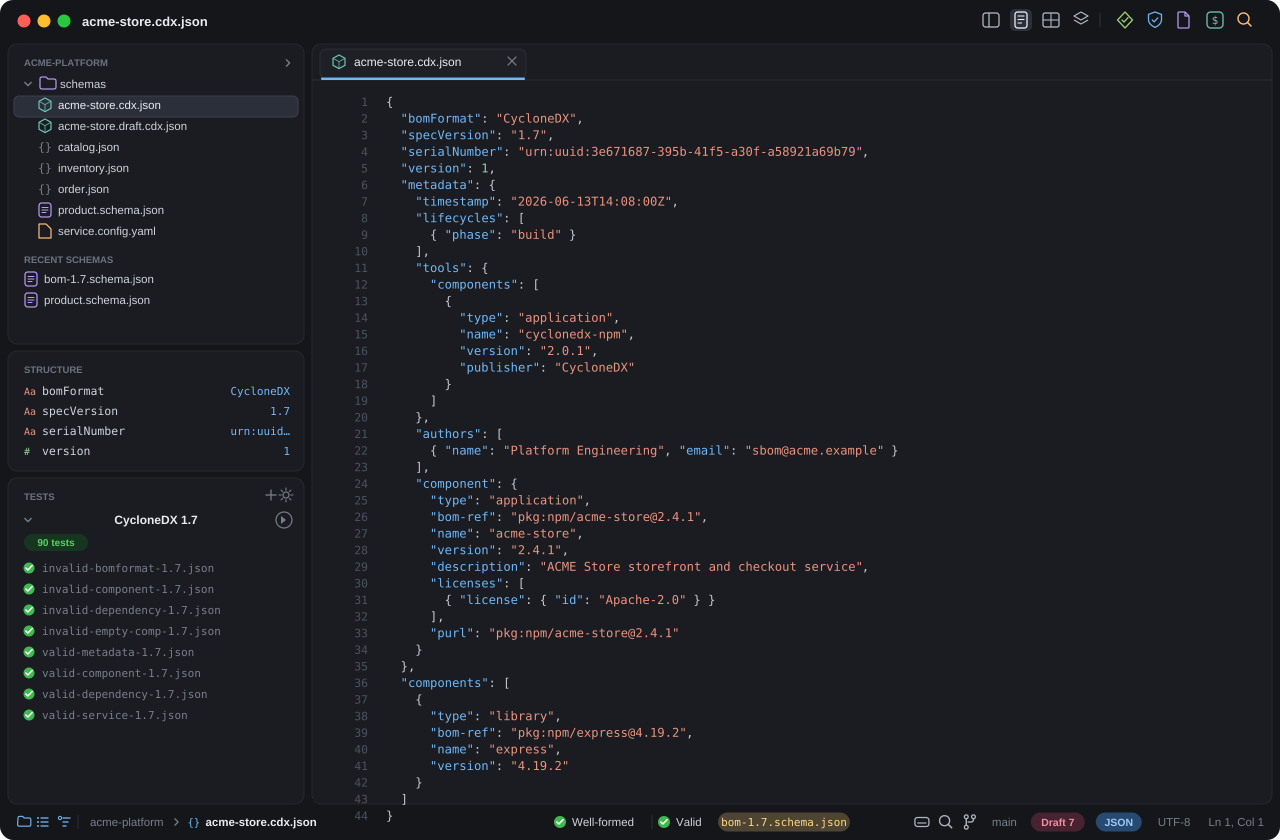
An AppKit app built over a Rust core, not a browser in a window. It stays quick on big documents, where web based editors crawl.
Validate against JSON Schema Draft 4, 6, 7, 2019-09, and 2020-12, auto detected from $schema, without touching the network.
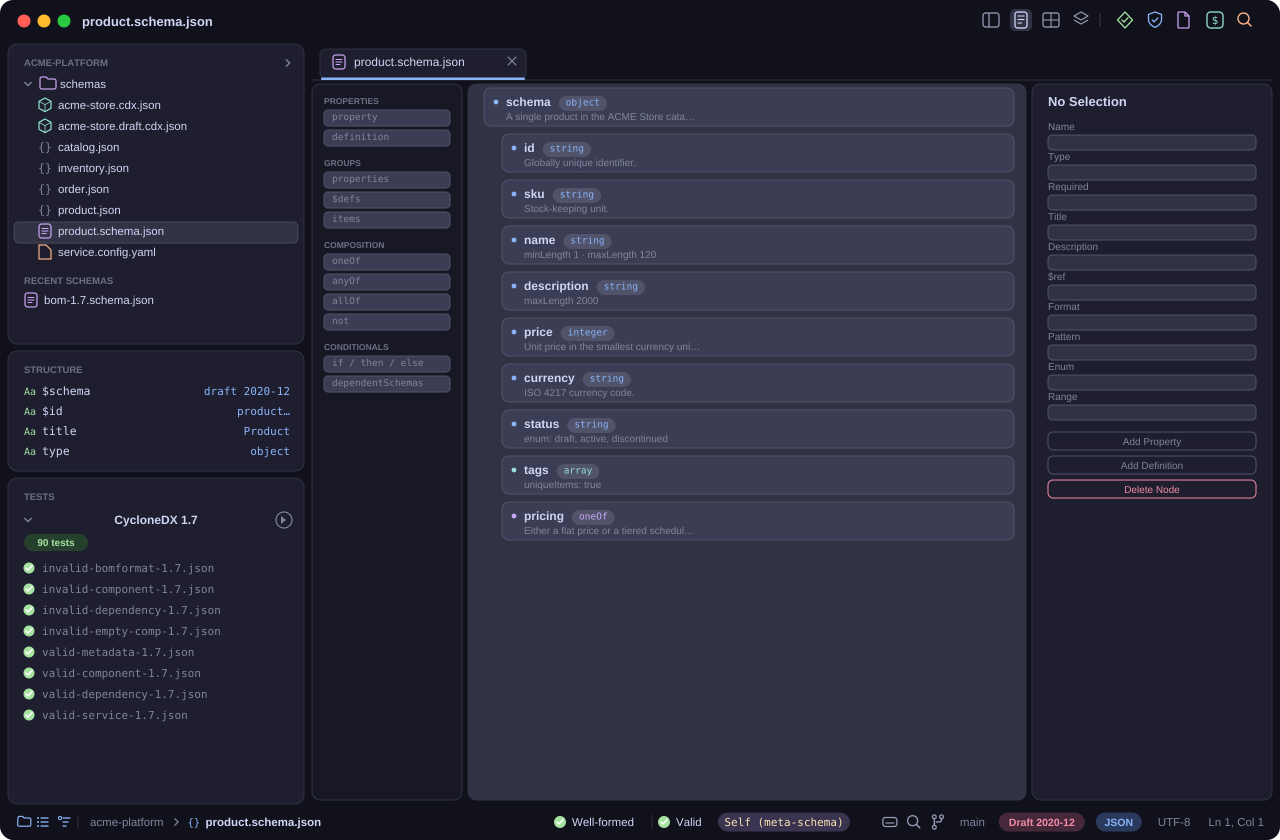
Switch a single document between a syntax highlighted Code editor, an editable Grid, and a visual schema Design canvas.
Every view edits the same underlying document through the same engine, so they never disagree, and structural edits preserve your existing formatting, byte for byte.
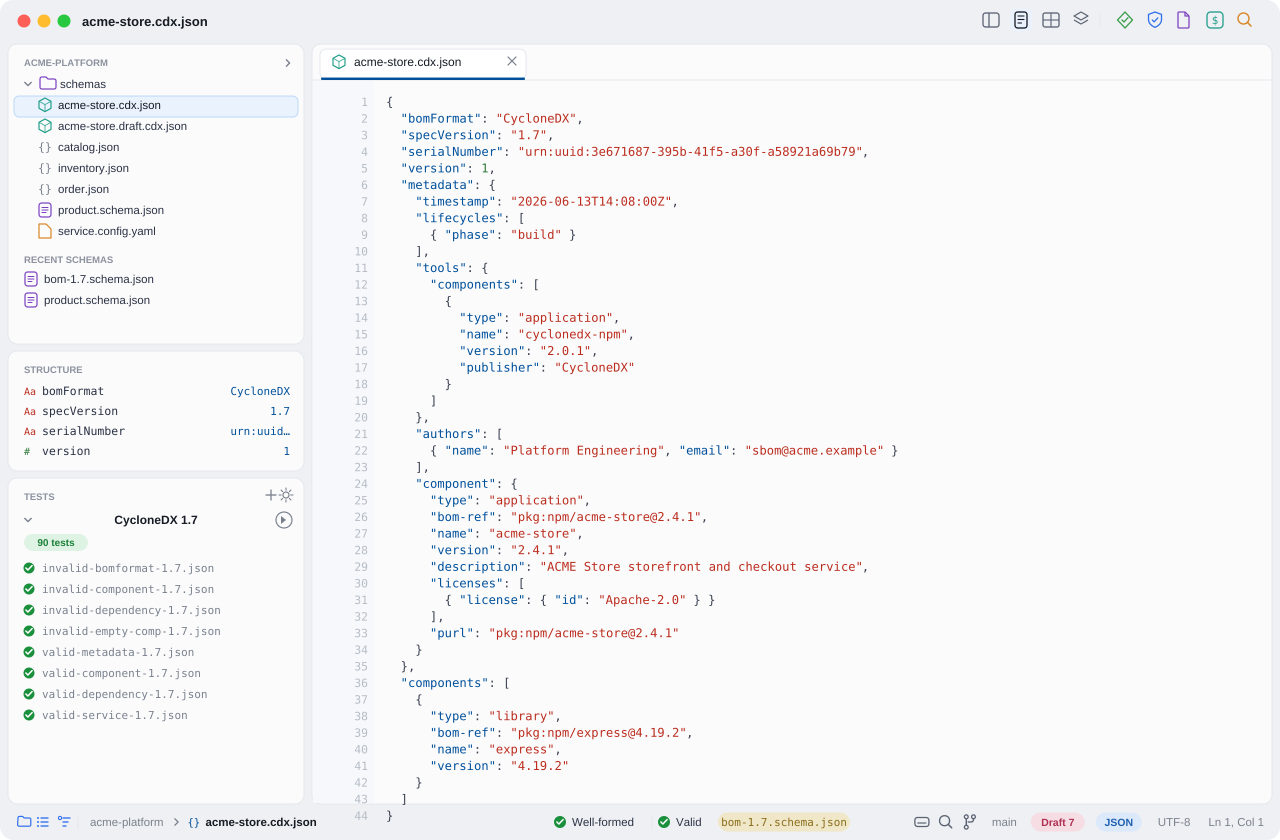
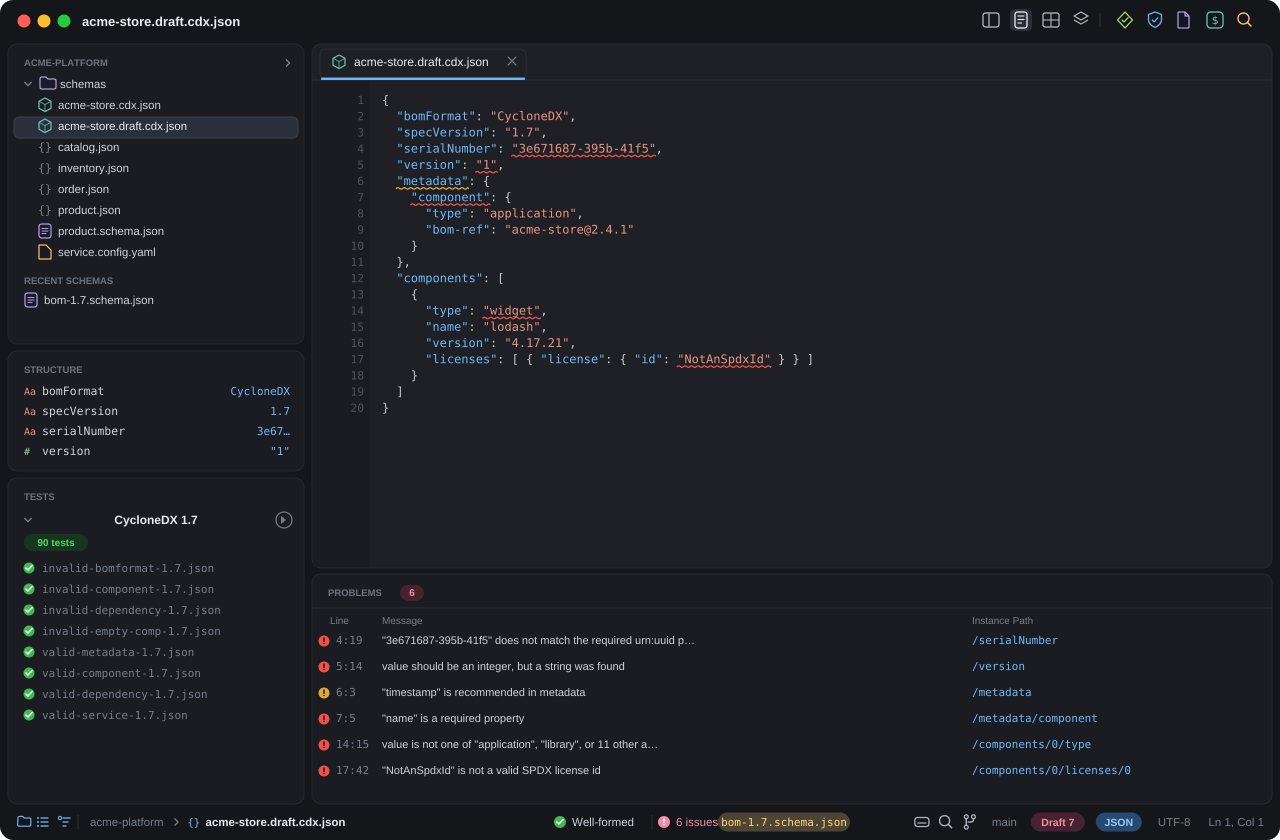
Syntax highlighting for JSON and YAML, line numbers, code folding, inline error squiggles, and find and replace. The status bar shows well formedness, validation state, the detected schema draft, and the JSON Pointer under your caret as you move.
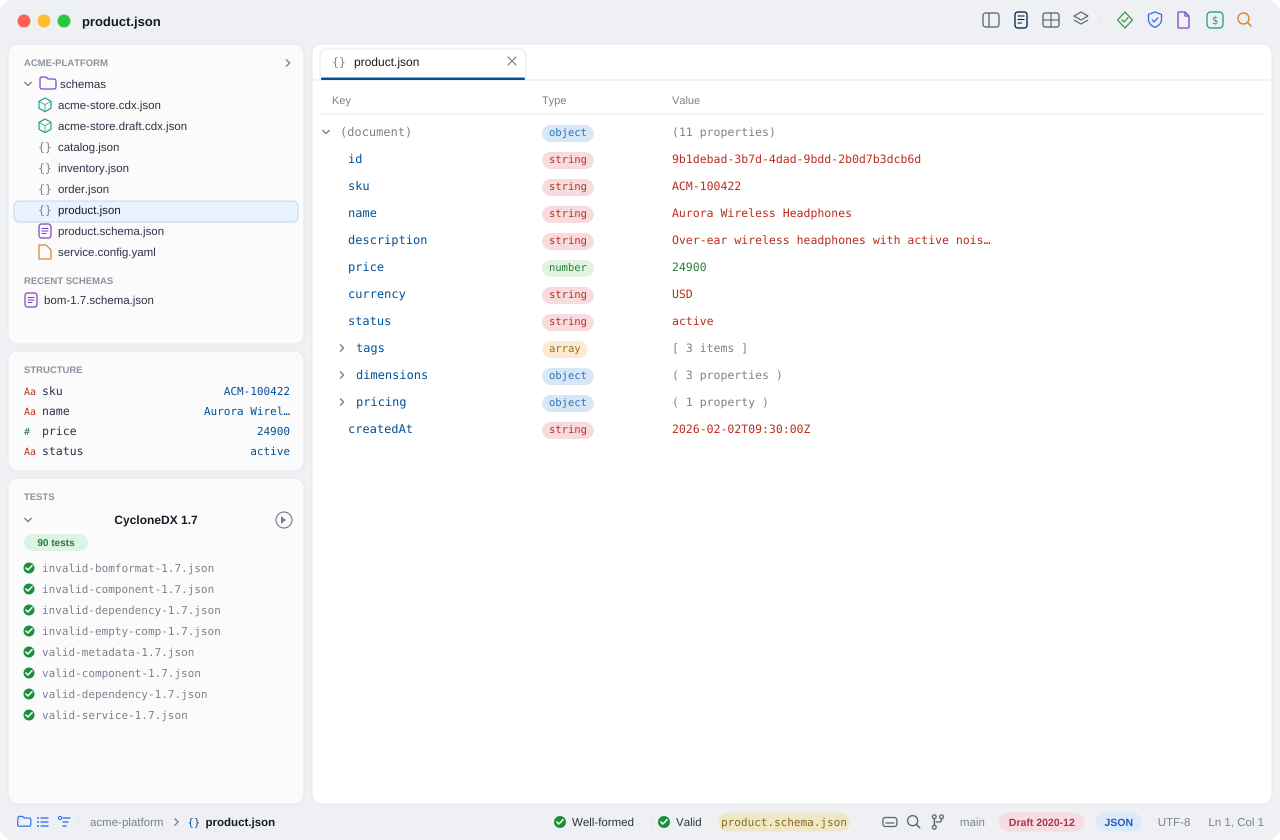
See the document as an outline of keys, types, and values. Rename keys, edit values, change a node's type, and add, remove, or duplicate nodes, then copy the JSON Pointer to any node. Edits touch only the bytes that change, so the rest of your file's formatting survives untouched.
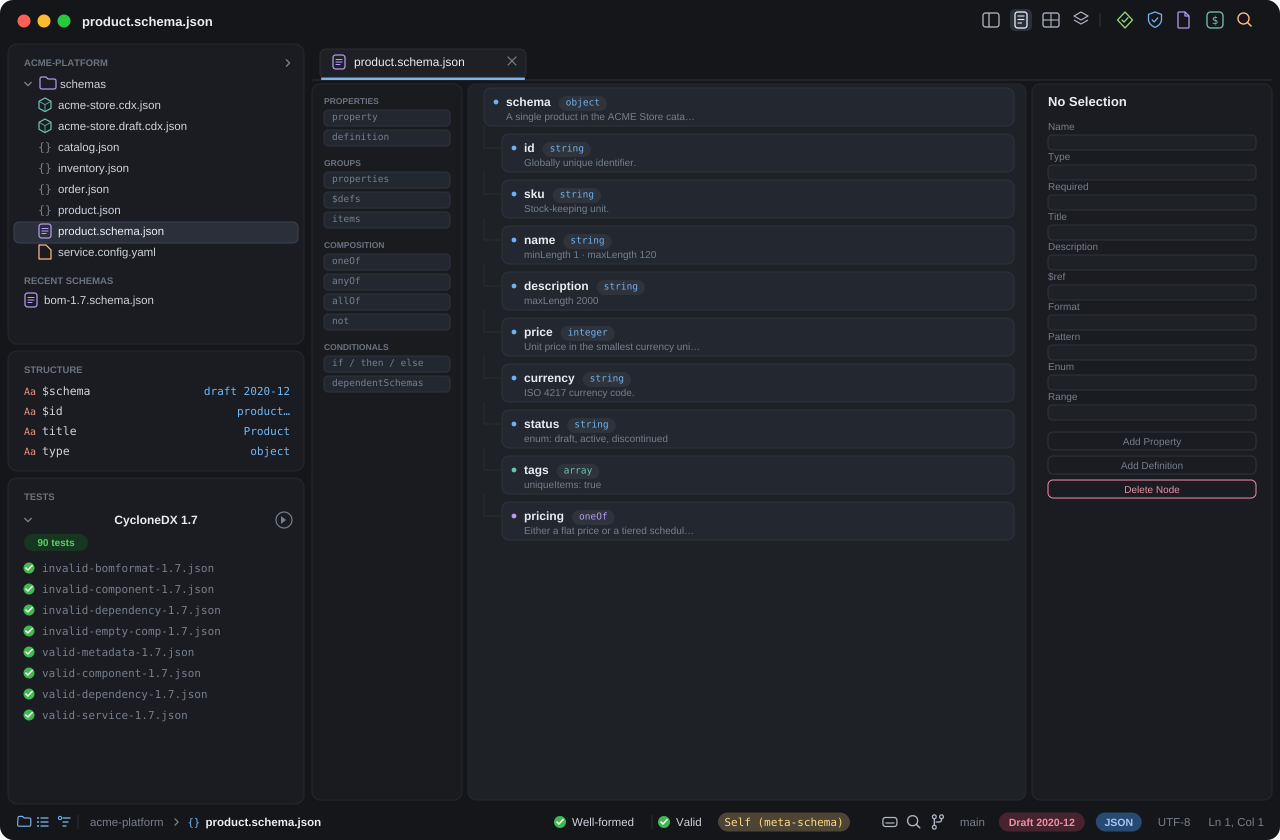
Build and read JSON Schema the way you would in an XML schema tool. The Design view lays out properties, $defs, items and prefixItems, compositions (oneOf, anyOf, allOf, not), conditionals, and $ref targets, with an inspector for titles, descriptions, types, required flags, formats, patterns, enums, and ranges.
$ref targets and jump to definitionsThe problems panel lists every failure, not just the first, each with a human readable message, the failing keyword, and the instance path. Double click to jump straight to it in any view.
Relative $refs resolve against the schema's folder; remote URIs can be mapped to local files so validation never reaches the network. Lenient mode is an explicit opt in.
Open a schema and it is automatically meta validated against its own draft's meta schema, so the schema you are writing is correct before you ever point data at it.
Validate whole folders or glob patterns against a schema with per file results, and run reusable test suites of known valid and known invalid fixtures.
The conversions and generators you usually paste into a half trusted website, here, native and offline.
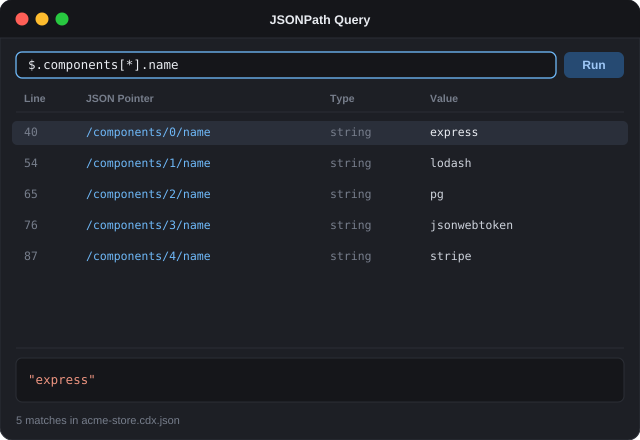
Run a JSONPath expression and get every match with its line, JSON Pointer, type, and value, then click a result to land on it in the document. Pair it with Go to JSON Pointer and the live caret pointer in the status bar to navigate large files without scrolling blind.
Everything you need to evolve a schema with confidence: pattern driven test suites, flexible schema resolution, and the entire SchemaStore catalog at hand.
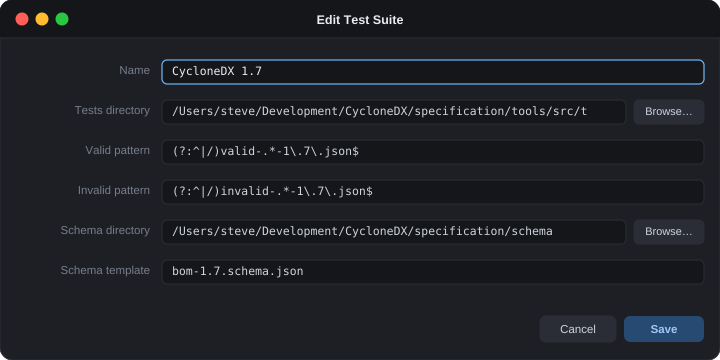
Describe a suite once: a folder of fixtures, a regex for the valid cases and one for the invalid ones, and a schema template whose placeholders are filled from the pattern's capture groups. One definition can cover hundreds of fixtures across many schema versions, without listing a single file by hand.
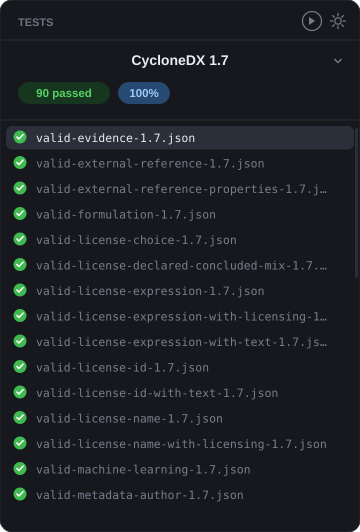
One click runs the whole suite and reports a live pass rate with a per fixture breakdown, so you always know which cases pass and which fail as a schema changes. The moment a once valid document stops validating, you will see it. Pictured: a CycloneDX 1.7 conformance suite, 90 fixtures, all green.
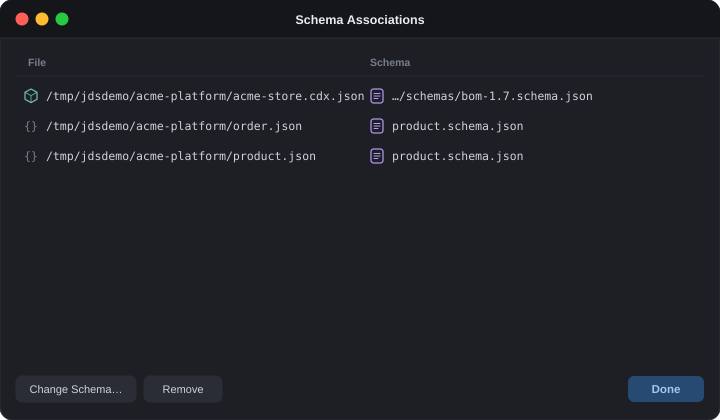
Associate any JSON or YAML file with a specific schema, so it validates the instant you open it. And map a schema's $id (typically a URL) to a local file, so you can validate against a schema that is not deployed yet, while it is still under development on your disk.
$id or URL (or a URL prefix) to a local fileValidate against any of the roughly 1,300 schemas in the public SchemaStore catalog. A snapshot is bundled so it works offline; the live catalog refreshes in the background.
Files whose names match a SchemaStore, OpenAPI, or Swagger pattern validate automatically, with no setup. Toggle it off whenever you want full manual control.
Sort properties by name and sort enum values, keeping each value's meta:enum documentation aligned, so diffs stay clean and reviews stay sane.
Check the prose in titles, descriptions, and documentation against American, British, or Oxford English. Oxford spelling is what international standards bodies such as Ecma and ISO commonly require.
Also bundled: official OpenAPI 3.0, 3.1, and Swagger 2.0 schemas (documents declaring openapi or swagger validate automatically, offline), per value enum docs via meta:enum in generated documentation, per document draft overrides, and a lenient mode that ignores unresolvable $refs, which you can opt into per validation.
A real Git client lives right inside the workspace, so a schema and its test fixtures stay in lockstep without a context switch to a terminal or a separate app.
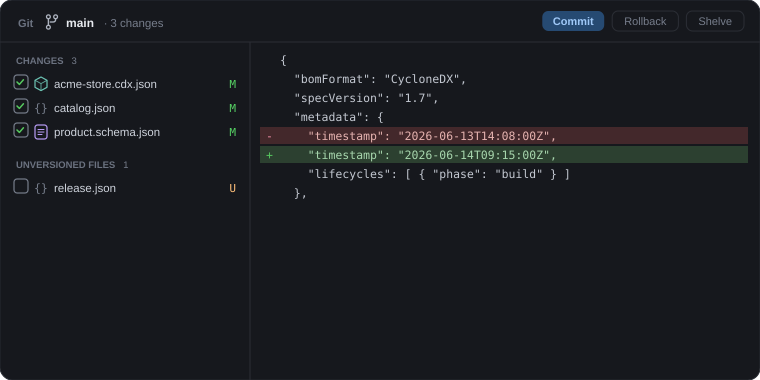
Review exactly what changed in an inline, colored diff, then stage and commit, switch or create branches, and update from origin, all from the panel and the status bar.
.gitignore, from the panel or the file treeDefault Light, Default Dark, and Match System out of the box, plus all four Catppuccin flavors. Themes are plain data, so the palette extends easily. Every control is themed; nothing falls back to a stock look.
No account, no sign in, no telemetry. Everything runs locally. The only network requests are optional downloads of remote schemas you reference, and you can map those to local files to stay fully offline.
JSON Design Studio is freeware. Use it at home or at work, on as many of your Macs as you like, at no cost. It is not open source; the full terms are in the End User License Agreement.
A signed disk image for Apple Silicon Macs. Drag the app to your Applications folder and you are done.
First launch: if macOS says the app is from an unidentified developer, right click the app and choose Open, or clear the quarantine flag:
xattr -dr com.apple.quarantine "/Applications/JSON Design Studio.app" Yes. JSON Design Studio is freeware, free for personal, educational, professional, and commercial use, on as many of your Macs as you like. There is no account and no trial. It is distributed under a proprietary end user license (it is not open source), included with the download. See the license.
An Apple Silicon Mac (M1 or later) running macOS 13 Ventura or newer.
No. Apps downloaded from the web are quarantined by Gatekeeper. On first launch, right click (or Control click) the app and choose Open, then confirm. Alternatively, run this in Terminal:
xattr -dr com.apple.quarantine "/Applications/JSON Design Studio.app"Draft 4, draft 6, draft 7, 2019-09, and 2020-12. The draft is auto detected from the schema's $schema keyword, and you can override it per document. Schemas are also meta validated against their draft's meta schema.
No. It is a native, local app with no telemetry and no account. Validation runs entirely on your Mac. The only time it reaches the network is to fetch a remote schema you explicitly reference by URL, and even that can be avoided by mapping remote URIs to local files for fully offline validation.
Yes. Parsing, validation, and structural edits live in a Rust core, and the Swift interface never parses the document itself. That keeps it responsive on large files where browser based tools tend to stall.
Just the standard git command, which comes with the Xcode Command Line Tools on macOS. JSON Design Studio drives your existing git install, so it works with the repositories and credentials you already have. The Git panel and branch control appear automatically when the file you are editing lives in a repository.
American, British, and Oxford English are included and run offline, like the rest of the app. Oxford English (Oxford spelling) is the variant international standards bodies such as Ecma and ISO commonly require, so you can check a specification against the spelling it mandates.
The current release targets Apple Silicon and macOS 13 or later. There is no Intel build today.
Version 0.6.5 for Apple Silicon. Free to download and free to use, at home or at work. Your documents never leave your Mac.